
نظرة عامة على المنتج
With this module, you can send sms with wisecp using Kobikom sms services.
Module Features
- You can send WISECP system notifications as SMS
- Full Open Source Addon
Install
- Copy/install the files in the downloaded file to the "coremio/modules/SMS" folder in the directory where the WISECP software is installed
- Make sure the folder structure is correct (Example: /home/public_html/coremio/modules/SMS/Kobikom/Kobikom/Kobikom.php)
- Go to your WISECP Dashboard.
- Go to the Settings menu and select the SMS Settings menu.
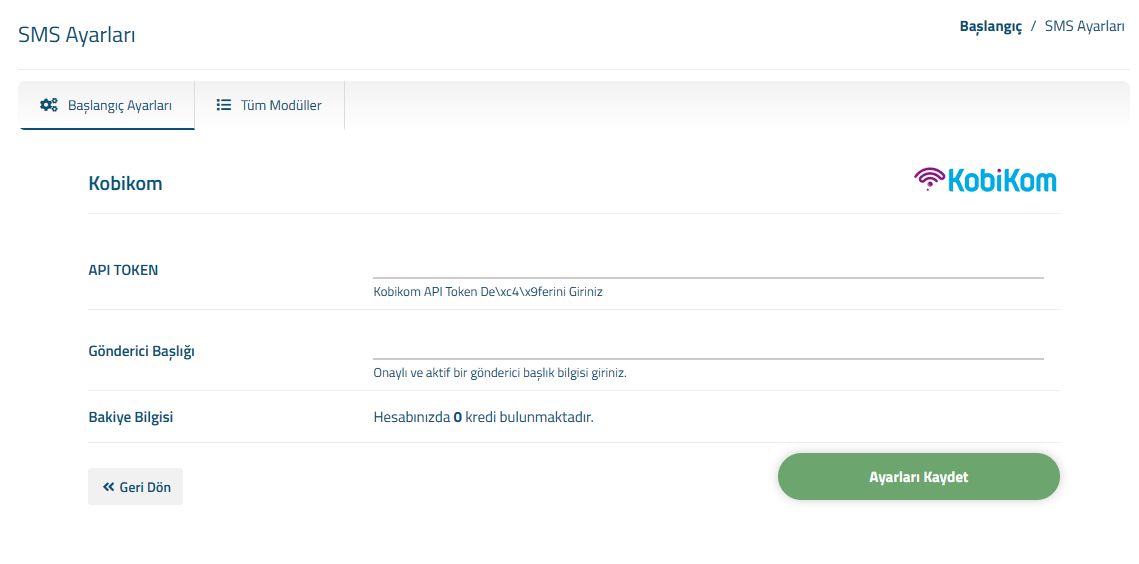
- Select the Kobikom module by going to the All Modules tab and enter the required information.
- If you want to use it as the default SMS module for WISECP System Notifications, select the Kobikom module from the "Active Module Selection" selection list in the Initial Settings tab on this page (SMS Settings).
Module Settings
- API KEY: Your API key is located in the SMS API menu under the Settings page after logging into your Kobikom SMS panel. Here you can change and view your key.
- SMS Sender: Select the one you want to use from the existing SMS senders you have created on the Kobikom SMS panel.
- API Version: Kobikom sms plugin uses the new API service.
- Save Setting button click and save the settings.